
Loading HoneyMesh...
Loading HoneyMesh...
Explore the real dashboard with guided hotspots that explain what each part of the platform is doing for operators in live environments.
Interactive Product Tour
Hover over the dashboard on desktop, or tap any highlighted region on mobile, to explore how HoneyMesh observes, correlates, and enforces in real time.
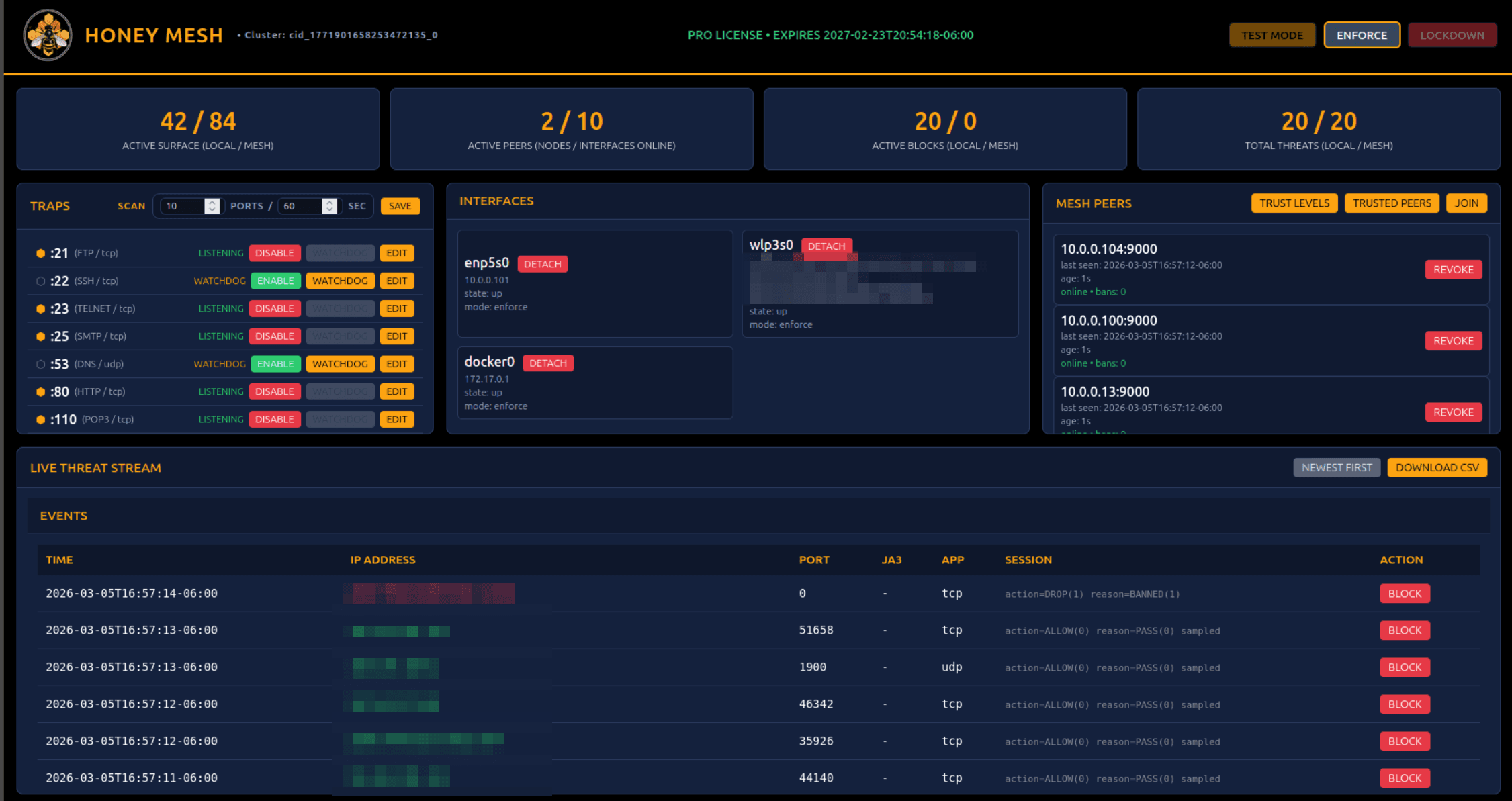
This is the operator control plane for the whole node. It lets you change protection posture instantly without losing visibility into license and cluster state.
HoneyMesh Features
I built HoneyMesh because traditional security tools always left me reacting too late. This is what it actually does in practice:
Instead of waiting for attackers to find your real systems, HoneyMesh puts realistic traps in front of them. It runs actual services on common ports like SSH, HTTP, FTP, and Redis that look and behave like the real thing.
Attackers get drawn in, reveal their tools and techniques, and give you visibility and early warning long before they reach anything important.
When a threat is detected, HoneyMesh does not just log it. It stops it instantly at the kernel level using eBPF and XDP, blocking malicious packets before they ever reach your applications or traditional firewall rules.
The result is near-zero performance impact, extremely low latency, and blocking that keeps working even under heavy attack.
HoneyMesh does not chase signatures or blocklists that go stale overnight. It watches real attacker behavior: how they probe, what they send, and how they move.
That catches automated scanners, bots, and unknown exploits that signature-based tools miss while keeping false positives low.
You see every interaction in real time with source IP, target port, protocol, JA3 fingerprint, and the outcome: Allowed, Dropped, or Banned.
From the dashboard, you can manually block anything on the spot or let the system handle it automatically.
When one node learns something useful, every other node in your mesh can benefit immediately. Bans and threat data propagate across approved systems, whether they are in the same rack or different data centers.
Operators can enable trusted sharing from the app, review peer identity and trust levels, and decide exactly how much to trust another network before sharing intelligence.
You choose exactly where protection runs. Attach HoneyMesh to any physical, virtual, or container interface and decide the mode: Test, Enforce, or Lockdown.
You can attach or detach protection without restarting services.
Flexible Operating Modes
Test Mode
Watch everything and block nothing. Ideal for initial deployment and visibility-first rollout.
Enforce Mode
Automatic kernel-level blocking based on what HoneyMesh observes in real traffic.
Lockdown Mode
Heightened deception and stricter response when conditions turn hostile.
Built for Real Operations
The dashboard is designed for real operators: clean metrics, straightforward controls, and direct access to the threat stream without bloated menus or unnecessary complexity.
If something looks off, you can jump in immediately, inspect what is happening, and take action without working through layers of abstraction first.